Two orders for the same custom plastic bag can land at wildly different prices, and the artwork usually has more to do with it than the bag itself. The print method, the number of colors, and how the file is prepared decide whether a run comes in clean and affordable or gets bogged down in setup fees and reprints. Here is how to specify a printed bag so the quote matches what you actually need.
Match the print method to your order size
Most printed poly bags are produced one of two ways. Flexographic printing uses a raised photopolymer plate for each color, inking the film directly as it feeds through the press. It is the long-standing workhorse for plastic bags because it runs fast and mixes true Pantone spot colors. Digital printing skips plates entirely and lays down CMYK process color straight from the file, which makes short runs cheap and fast but limits you to process color rather than exact spot matches.
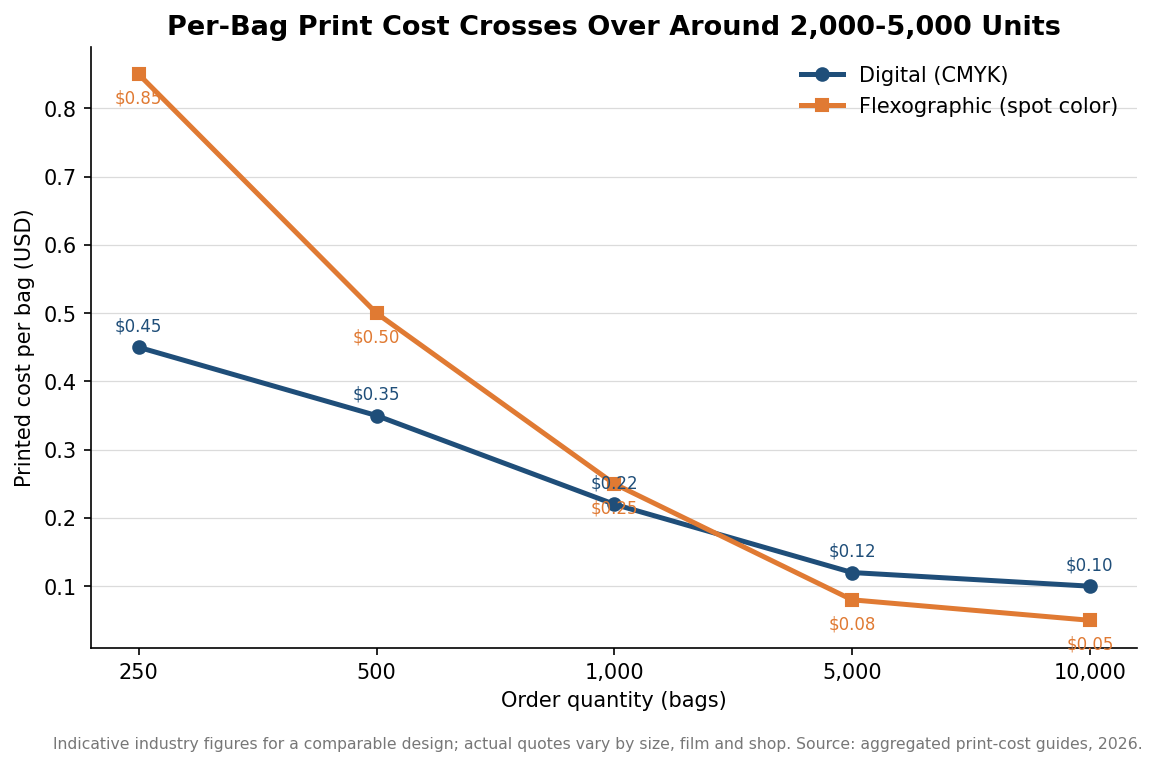
The practical dividing line is quantity. Digital typically wins under roughly 2,000 bags because there is no tooling to pay off, while flexo pulls ahead once volume climbs past about 5,000 and the plate cost spreads thin across the run. The 2,000-to-5,000 band is a genuine gray zone where you should price both. As a rough guide from published print-cost comparisons, a comparable one-to-two color design ran about $0.45 per bag digitally at 250 pieces versus $0.85 flexo, drew even near 1,000 pieces, and flipped to roughly $0.08 flexo against $0.12 digital at 5,000. Treat those as indicative rather than a quote for your specific bag.
Minimum order quantities follow the same logic. Digital runs often start around 250 bags because setup is minimal; flexo minimums are commonly higher, in the 500-and-up range, since a shop needs enough volume to justify cutting plates. If you only need a few hundred bags with a simple mark, ask specifically about digital or screen printing rather than assuming flexo is the only option.
Count your colors before you count anything else
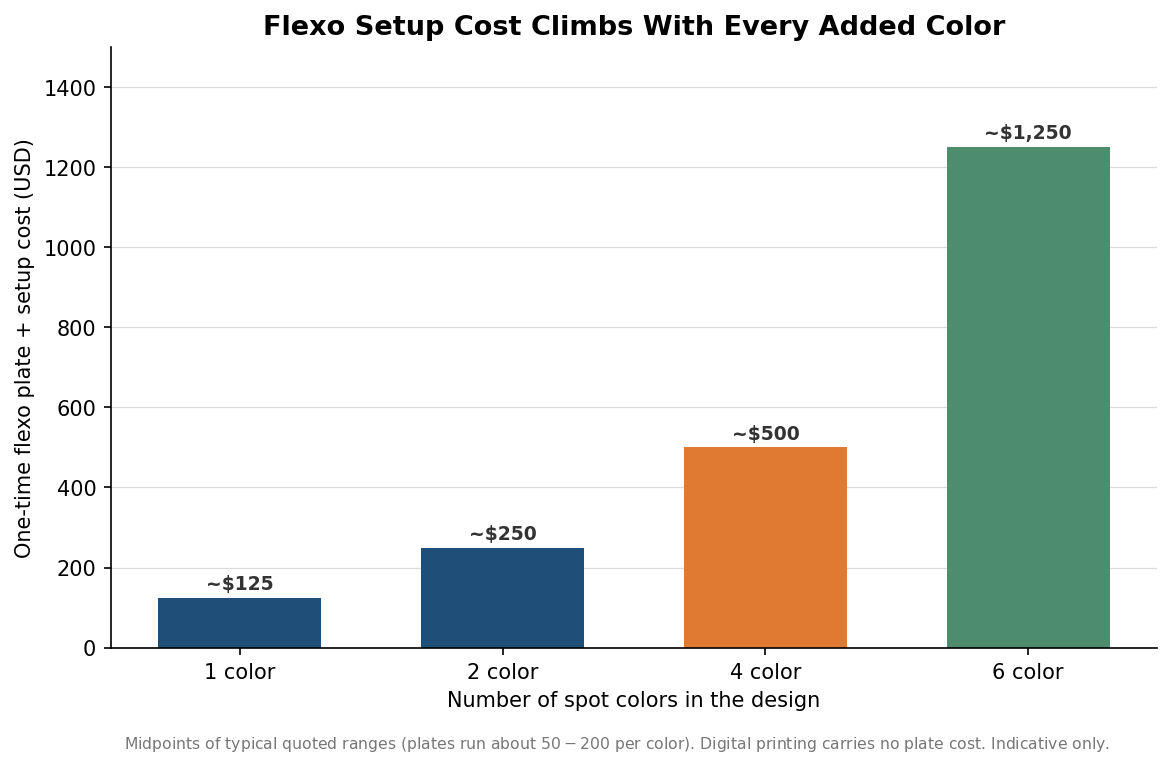
Every spot color in a flexographic job needs its own plate, and plates are a one-time charge that lands on your first invoice whether you order 500 bags or 50,000. Plate and setup fees commonly run about $50 to $200 per color, so a clean two-color logo carries far less tooling than a four- or six-color design. A single-color print might add a little over a hundred dollars in setup, a four-color job several hundred, and a six-color job can push past a thousand before a single bag is printed.
This is why simplifying artwork is the cheapest lever you have. A logo redrawn to two or three solid spot colors prints crisply on film, holds registration at speed, and keeps setup low. Photographic images and heavy gradients are where flexo struggles and costs climb; if your design truly needs that, digital or gravure is the better conversation. When you request a quote, state the exact number of colors and whether any are metallic or specialty inks, because those change both plates and press time.
Prepare artwork the press can actually use
Print shops want vector files for bag work, usually AI, EPS, or a high-resolution PDF with fonts converted to outlines. Vector art scales to any bag size without pixelation and separates cleanly into individual color plates. Supplying a low-resolution JPG or a screenshot of a logo almost always triggers an art charge to rebuild it, and the rebuilt version may not match your brand exactly.
Specify your colors as Pantone (PMS) references rather than describing them, since “our blue” means nothing to a press operator mixing ink. Build in a small amount of tolerance too: flexo holds registration well but not perfectly, so avoid designs that depend on hairline gaps between two colors lining up exactly. Leave a safe margin around the print area rather than running critical text to the very edge, and ask the shop for its bleed and safe-zone template for the specific bag style you are ordering. Decide early whether you want surface printing, which sits on the outside of the bag, or reverse printing trapped inside a laminated film for a glossier, more protected look, as the latter is only available on certain constructions.
Build proofs and lead time into the schedule
Turnaround splits along the same digital-versus-flexo line. A straightforward digital run can move in roughly three to five business days once art is approved, while flexo more often takes about seven to ten because plates have to be made and the press set up and registered. Neither clock starts until you sign off on a proof, so treat proof approval as part of your own timeline, not the printer’s.
Always ask for a proof, and know which kind you are getting. A digital or PDF proof confirms layout, spelling, and placement but not exact ink color on film; a physical or press proof shows real color on the actual material and costs more. For a first order or a color-critical brand, the press proof is usually worth it. Reputable shops calibrate to tight color tolerances, often a Delta E under 2.0, but that only helps if you have given them a real Pantone target to hit.
A quick pre-order checklist
Before you send anything to a printer, confirm five things: your final quantity and how it maps to the digital-or-flexo break-even, the exact number and type of ink colors, vector artwork with outlined fonts and Pantone callouts, the bag style with its bleed and safe-zone template, and the proof type and lead time you need to hit your in-hand date. Nailing those down turns a vague “how much for printed bags?” into a quote you can actually compare across suppliers, and it keeps the surprises off your invoice. Where a figure here is a range or an industry average, ask your supplier to confirm the exact number for your job before you commit.